openclaw@ecm-dbc4:~$ curl -o- https://raw.githubusercontent.com/nvm-sh/nvm/v0.40.3/install.sh | bash % Total % Received % Xferd Average Speed Time Time Time Current Dload Upload Total Spent Left Speed 100 16631 100 16631 0 0 36934 0 --:--:-- --:--:-- --:--:-- 36875 => Downloading nvm as script to '/home/openclaw/.nvm'
=> Appending nvm source string to /home/openclaw/.bashrc => Appending bash_completion source string to /home/openclaw/.bashrc => Close and reopen your terminal to start using nvm or run the following to use it now:
openclaw@ecm-dbc4:~$ nvm install 24 Downloading and installing node v24.14.0... Downloading https://nodejs.org/dist/v24.14.0/node-v24.14.0-linux-x64.tar.xz... ################################################################################################################################################################################# 100.0% Computing checksum with sha256sum Checksums matched! manpath: can't set the locale; make sure $LC_* and $LANG are correct Now using node v24.14.0 (npm v11.9.0) Creating default alias: default -> 24 (-> v24.14.0)
验证 Node.js 版本:
node -v # Should print “v24.14.0”.
openclaw@ecm-dbc4:~$ node -v # Should print “v24.14.0”. v24.14.0
下载并安装 pnpm:
corepack enable pnpm
1 2 3 4 5 6
openclaw@ecm-dbc4:~$ corepack enable pnpm openclaw@ecm-dbc4:~$ pnpm -v ! Corepack is about to download https://registry.npmjs.org/pnpm/-/pnpm-10.30.3.tgz ? Do you want to continue? [Y/n] y
10.30.3
验证 pnpm 版本:
pnpm -v
安装完成之后,运行 pnpm setup这个命令会自动帮你完成所有配置:
1 2 3 4 5 6 7 8 9 10 11 12 13
openclaw@ecm-dbc4:~$ pnpm setup
Appended new lines to /home/openclaw/.bashrc

Next configuration changes were made:
export PNPM_HOME="/home/openclaw/.local/share/pnpm"
case ":$PATH:" in
  *":$PNPM_HOME:"*) ;;
  *) export PATH="$PNPM_HOME:$PATH" ;;
esac

To start using pnpm, run:
source /home/openclaw/.bashrc
openclaw@ecm-dbc4:~$ source /home/openclaw/.bashrc manpath: can’t set the locale; make sure $LC_* and $LANG are correct
如果输出中很多项显示 “Cannot set LC_* to default locale: No such file or directory” 或者直接是 POSIX,就说明系统缺少你当前环境变量所要求的 locale,缺少locale的en_DK.UTF-8配置, 那么就需要切换到root生成一个
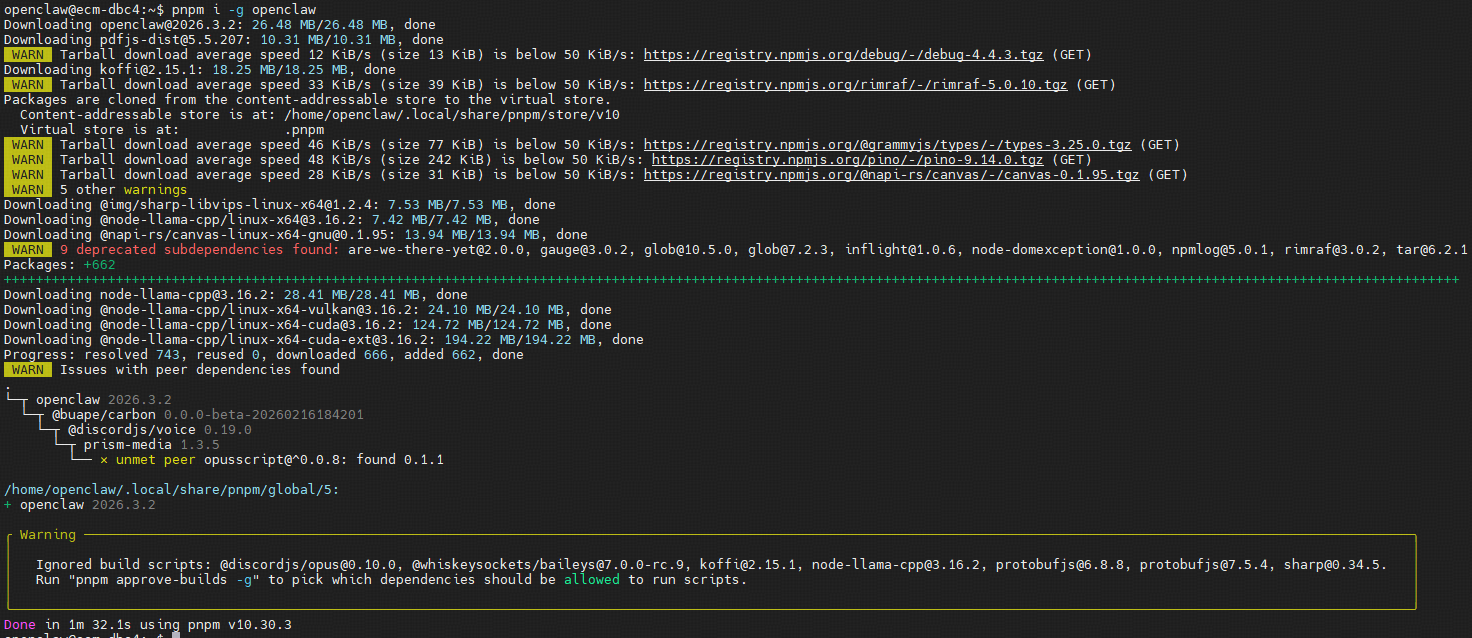
╭ Warning ──────────────────────────────────────────────────────────────────────────────────────────────────────────────────────────────────────────────────────────────────────╮ │ │ │ Ignored build scripts: @discordjs/opus@0.10.0, @whiskeysockets/baileys@7.0.0-rc.9, koffi@2.15.1, node-llama-cpp@3.16.2, protobufjs@6.8.8, protobufjs@7.5.4, sharp@0.34.5. │ │ Run "pnpm approve-builds -g" to pick which dependencies should be allowed to run scripts. │ │ │ ╰───────────────────────────────────────────────────────────────────────────────────────────────────────────────────────────────────────────────────────────────────────────────╯ Done in 1m 32.1s using pnpm v10.30.3
│
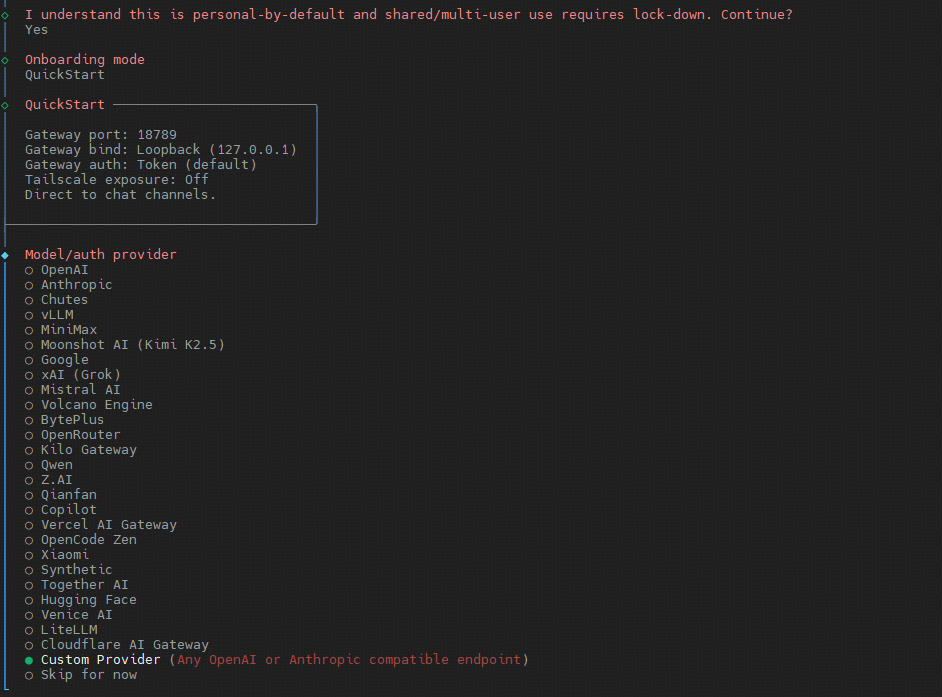
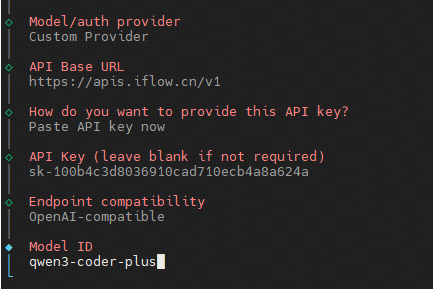
◇  Model/auth provider
│  Custom Provider
│
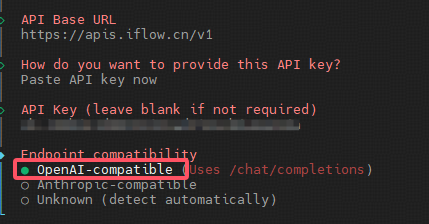
◇  API Base URL
│  https://apis.iflow.cn/v1
│
◇  How do you want to provide this API key?
│  Paste API key now
│
◇  API Key (leave blank if not required)
│  sk-b2c93726332e8ebb0ac88d4e45c9f068
│
◇  Endpoint compatibility
│  OpenAI-compatible
│
◇  Model ID
│  qwen3-coder-plus
│
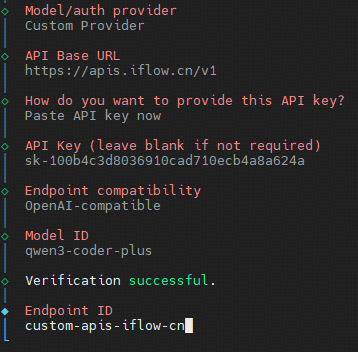
◇  Verification successful.
│
◆  Endpoint ID
│  custom-apis-iflow-cn█
└
Config overwrite: /home/openclaw/.openclaw/openclaw.json (sha256 0b8605a0ecc422e42495b918fd5c45a9198536a4bb11b12bac2efab879e246d1 -> bcfe34fbc45eb2678e32cf1a8ff9ae2aa345404ab90a05208076328fb69f797d, backup=/home/openclaw/.openclaw/openclaw.json.bak)
│
◇  Systemd ───────────────────────────────────────────────────────────────────────────────╮
│                                                                                         │
│  Systemd user services are unavailable. Skipping lingering checks and service install.  │
│                                                                                         │
├─────────────────────────────────────────────────────────────────────────────────────────╯
│
◇  Gateway service ─────────────────────────────────────────────────────────────────────╮
│                                                                                       │
│  Systemd user services are unavailable; skipping service install. Use your container  │
│  supervisor or `docker compose up -d`.                                                │
│                                                                                       │
├───────────────────────────────────────────────────────────────────────────────────────╯
│
◇
Health check failed: gateway closed (1006 abnormal closure (no close frame)): no close reason
  Gateway target: ws://127.0.0.1:18789
  Source: local loopback
  Config: /home/openclaw/.openclaw/openclaw.json
  Bind: loopback
│
◇  Health check help ────────────────────────────────╮
│                                                    │
│  Docs:                                             │
│  https://docs.openclaw.ai/gateway/health           │
│  https://docs.openclaw.ai/gateway/troubleshooting  │
│                                                    │
├────────────────────────────────────────────────────╯
│
◇  Optional apps ────────────────────────╮
│                                        │
│  Add nodes for extra features:         │
│  - macOS app (system + notifications)  │
│  - iOS app (camera/canvas)             │
│  - Android app (camera/canvas)         │
│                                        │
├────────────────────────────────────────╯
│
◇  Control UI ───────────────────────────────────────────────────────────────────────────────╮
│                                                                                            │
│  Web UI: http://127.0.0.1:18789/                                                           │
│  Web UI (with token):                                                                      │
│  http://127.0.0.1:18789/#token=108ebadd2a57cebce0ef7d02d87a8be99d97418725bdfd97            │
│  Gateway WS: ws://127.0.0.1:18789                                                          │
│  Gateway: not detected (gateway closed (1006 abnormal closure (no close frame)): no close  │
│  reason)                                                                                   │
│  Docs: https://docs.openclaw.ai/web/control-ui                                             │
│                                                                                            │
├────────────────────────────────────────────────────────────────────────────────────────────╯
│
◇  Workspace backup ────────────────────────────────────────╮
│                                                           │
│  Back up your agent workspace.                            │
│  Docs: https://docs.openclaw.ai/concepts/agent-workspace  │
│                                                           │
├───────────────────────────────────────────────────────────╯
│
◇  Security ──────────────────────────────────────────────────────╮
│                                                                 │
│  Running agents on your computer is risky — harden your setup:  │
│  https://docs.openclaw.ai/security                              │
│                                                                 │
├─────────────────────────────────────────────────────────────────╯
│
◇  Shell completion ────────────────────────────────────────────────────────╮
│                                                                           │
│  Shell completion installed. Restart your shell or run: source ~/.bashrc  │
│                                                                           │
├───────────────────────────────────────────────────────────────────────────╯
│
◇  Dashboard ready ────────────────────────────────────────────────────────────────╮
│                                                                                  │
│  Dashboard link (with token):                                                    │
│  http://127.0.0.1:18789/#token=108ebadd2a57cebce0ef7d02d87a8be99d97418725bdfd97  │
│  Copy/paste this URL in a browser on this machine to control OpenClaw.           │
│  No GUI detected. Open from your computer:                                       │
│  ssh -N -L 18789:127.0.0.1:18789 openclaw@<host>                                 │
│  Then open:                                                                      │
│  http://localhost:18789/                                                         │
│  http://localhost:18789/#token=108ebadd2a57cebce0ef7d02d87a8be99d97418725bdfd97  │
│  Docs:                                                                           │
│  https://docs.openclaw.ai/gateway/remote                                         │
│  https://docs.openclaw.ai/web/control-ui                                         │
│                                                                                  │
├──────────────────────────────────────────────────────────────────────────────────╯
│
◇  Web search (optional) ─────────────────────────────────────────────────────────────────╮
│                                                                                         │
│  If you want your agent to be able to search the web, you’ll need an API key.           │
│                                                                                         │
│  OpenClaw uses Brave Search for the `web_search` tool. Without a Brave Search API key,  │
│  web search won’t work.                                                                 │
│                                                                                         │
│  Set it up interactively:                                                               │
│  - Run: openclaw configure --section web                                                │
│  - Enable web_search and paste your Brave Search API key                                │
│                                                                                         │
│  Alternative: set BRAVE_API_KEY in the Gateway environment (no config changes).         │
│  Docs: https://docs.openclaw.ai/tools/web                                               │
│                                                                                         │
├─────────────────────────────────────────────────────────────────────────────────────────╯
│
◇  What now ─────────────────────────────────────────────────────────────╮
│                                                                        │
│  What now: https://openclaw.ai/showcase ("What People Are Building").  │
│                                                                        │
├────────────────────────────────────────────────────────────────────────╯
│
└  Onboarding complete. Use the dashboard link above to control OpenClaw.
此时,服务是安装失败的,运行服务会提示
1
2
ailed to connect to user scope bus via local transport: $DBUS_SESSION_BUS_ADDRESS and $XDG_RUNTIME_DIR not defined (consider using --machine=<user>@.host --user to connect to bus of other user)
openclaw@ecm-dbc4:~$ systemctl --user start openclaw-gateway.service
Failed to start openclaw-gateway.service: Unit openclaw-gateway.service not found.